Wednesday, 18 March 2015

Tips To Save Battery on Android Devices

Use Power Saving Mode

Most of the recent Android manufacturers have added some form of power saving mode . You can automatically save Your battery life as soon as it reaches below predetermined battery level.

Stock Android only offers Battery stats , whereas Latest, Android Lollipop has a battery saver option (In-built) . If you cant  find a power saving mode then download the app called Juice Defender .


Automate Your phone

You don't need your phone syncing away through the night, so why not introduce a bedtime routine that automatically silences it and kills your data and Wi-Fi connections? With apps like AutomateIt and Tasker you can also automatically turn things on and off based on triggers and rules you define.


Reduce Brightness

(Go To Settings >> Display >> Brightness)
Most of us can see Android display quite well with the backlight feature turned off. Move the brightness slider all the way to the left and try using the device that way. If you cant see move the slider a little bit to the right . Adjust the display according to your convenience and minimal use of backlightining. If you wanna automate your display brightness Then download the App Twilight which automatically adjusts the screen brightness according to the local timings.


Dump Unnecessary Widgets


Just Because they're sitting on your homescreen , seemingly inactive , Doesn't mean that they dont consume power . This goes for all widgets that poll status updates in the background, as well as those sitting rite their at your home screen (But don't dump everything, as part of what makes Android great are the home screen customizations; just remove the ones you don't use.)

100 % battery 

After your battery reaching 100% keep it for charging for more 5-10 minutes. Then unplug the charger and reboot the device . (you all must be thinking I'm kinda Kidding. But on serious note this works 100000%) . Your device then consumes less amount of power then before .


I hope all this tips helps you to save your battery life . If you have got any more tips for saving battery please comment below. For any kind of assistance feel free to ask me. I'll try my best to help you out.


Thanks for reading,
Please comment below for what type of applications you want to see featured in my next blog.

Monday, 9 March 2015

Best HD Games in Android

Injustice : Gods Among US

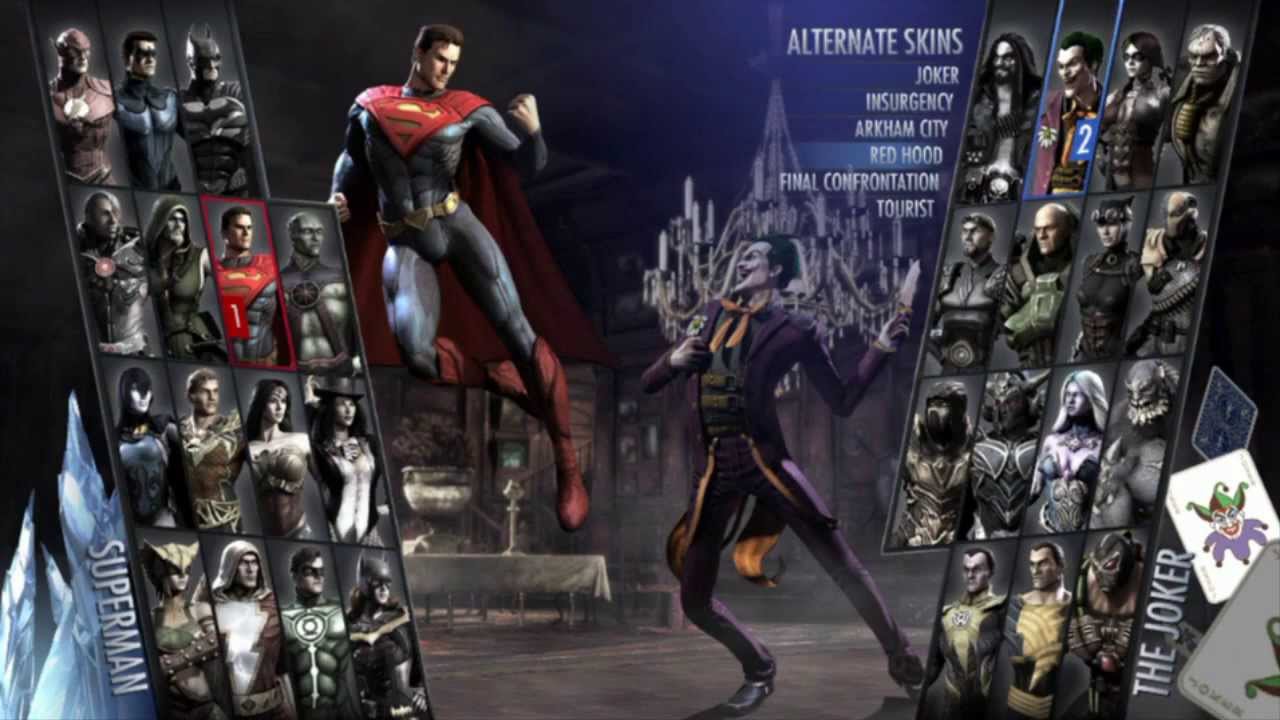
Injustice: Gods Among Us is a fighting video game based upon the fictional universe of DC Comics. involves one-on-one matches within a two-dimensional plane, although characters and backgrounds are rendered in a three dimensional fashion. Contrarily to the classic scheme of multiple rounds with health bars refilling in between, Injustice follows a scheme similar to the Killer instinct series, where each match consists of a single round, in which each player has two health bars.The game uses a four-button control layout of light, medium, and heavy attacks, alongside a "character trait" button that activates a unique ability or attack designed to showcase each character.

Deer Hunting 2014

Story of the game is not, we simply execute short single mission. In each mission, we have to kill one or more animals, while constantly changing terrain, time of day, as well as weapons and conditions of the mission that we must abide by.
Typical situations - hunting deer, shooting ducks in a search in the woods wolverines. The most interesting job in the game - with predators. Wolves and bears will attack us as soon as they see or hear the shot, also to help them other animals can come out from the pack.
Mechanical Deer Hunter 2014 is good, the system considers entering the head, trunk, neck, legs and other body parts. Of course, getting into the trunk give the minimum number of points, and for getting into the head and legs give bonuses.
With the money in the game and you can buy better weapons. It should be done carefully, because some areas are only allowed with certain weapons, as other weapons of power is not enough to accomplish the mission. In the beginning, we give two weapons - a rifle and a shotgun, a little later, it added a machine that must be bought in the learning process.

Modern Combat 5 : Blackout

It is the latest sequel from Gameloft's popular first-person shooter franchise, and it's the best FPS for mobile to date. Featuring both a single-player campaign and multiplayer game modes, it's closely modeled after the Battlefield and Call of Duty games on consoles and PCs, but while it looks great and plays well, it still doesn't live up to the games it emulates.
Is that a surprise? Not really. It's incredibly difficult for a touchscreen FPS to compete with the precise control systems on consoles or keyboard-and-mouse setups. So one thing you need to know right away is you won't have the tight control you might be used to in other FPS games you've played.
The other thing you need to know about Modern Combat 5: Blackout is you can't play offline, so if you don't have Internet connectivity, you can't play even the single-player missions.


Gangstar Rio: City of Saints

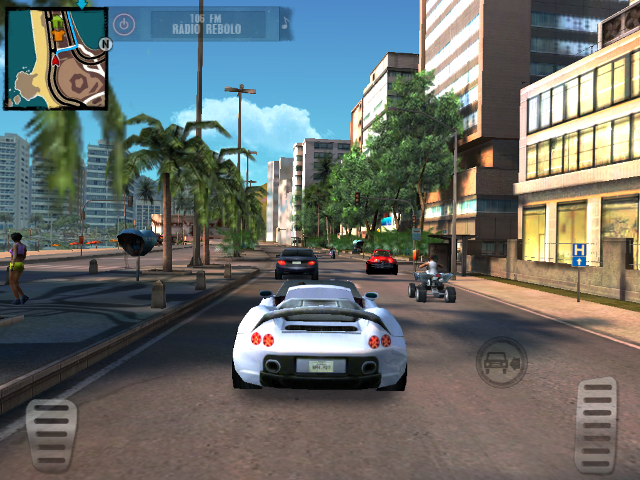
For the first time ever in a sandbox game, explore the city of Rio de Janeiro, Brazil. Discover 5 different neighborhoods including the favelas, business district, beaches and jungle.  Also, for the first time in the Gangstar series, explore indoor environments fully realized in 3D. 
Over 60 varied missions to complete, plus dozens of random events to give you hours of fun.  Kill corrupt politicians, protect witnesses, deliver special packages, steal cars and find out who tried to kill you and leave you for dead.

Asphalt 8 : Airborne 

As i have mentioned about this earlier. I wanna add that this game is My All Time favorite, It's graphics, Controls & Complete tutorial just drives any crazy. On my upcoming blog I will even add this game into Must have Android Games Section. Here's a review for this game:
Asphalt 8: Airborne is a detailed and dynamic racing game that lets you build up your racing skills and acquire better cars to compete against the best. Even if you've never played a game like this before, the responsive controls and great graphics will have you feeling at home in no time. 

At the end I wanna say that if you like my blog please share it and I promise you guys that if my blog gets More Views then I'm gonna start Making Youtube Videos For In-App experience and Game walk through videos definately.

Love you all too much 😘💜
Keep viewing my blog And keep Shwring it !!


Thursday, 5 March 2015

MUST HAVE APPS FOR ANDROID

500 Firepaper

500 Firepaper provides a live wallpaper and a daydream showing you the latest images from 500px throughout the day.You never need to look at that boring old wallpaper again, or search for hours for a nice new one. This app will show you quality photographs from all over the world - different ones each day!The feature (popular, editor's choice, fresh, etc) and categories displayed are of course configurable, as is the refresh interval and the brightness of the images.
Please note that high resolution imagery and animation takes quite a bit of memory, so obviously this app is aimed at high-end devices.

EveryPost

Everypost is a neat and simple little app that lets you post to several social networks in one go. Basically, you type whatever it is that you feel like sharing, mark the networks you want it to appear on, hit that big "Post" button and you're done. You may attach your own photos or videos to your posts, as well as YouTube videos, Grooveshark songs, and Flickr images. Plus, there's a built-in URL shortener and a text shortener for Twitter that lets you avoid that 140 character limit. 

We just gave this app a try ourselves and we can confirm that it work pretty well. Sure, you do have to spend some time on setting up the app, which means that you will have to allow it to post on your behalf, but the process takes just a few minutes and you don't have to do it more than once per social network. 

Everypost is available for free on iOS and Android without any pesky advertisements getting in your way. Feel free to give it a try!

Horizon

Horizon comes equipped with three straightening modes, including Flex, which serves up a flexible frame-size enabled by tilt-to-zoom. This adjusts the zooming scale when you tilt your device, to make things look a little smoother.
The result, when you play it back, should look as though it was shot in landscape to the casual observer. Of course, this doesn’t flawlessly replicate actual ‘landscape’ as the cropping of the top/bottom of the image and the subseqent ‘zooming’ affects the quality of the shot, but it does a decent job and it is pretty clever stuff all the same.

Vybe

Create custom vibration patterns for your contacts and know who’s calling or messaging without looking at your phone. A unique experience where you can design distinct vibration patterns for your phone calls, text messages and app notifications.So, now if you are in the classroom, on the road or stuck in a meeting and find it inconvenient to take the phone out, you can still know who might on the other end of the line.And it’s pretty simple! Just create a vibration, assign it to a contact and know who’s trying to reach out.To put it simple just Create, Assign and Feel it.

Versus

If you have ever had the urge to compare two things, be it the hottest new phones or washer-dryers, it has usually involved a bit of good researching. Versus is a new app on Android that will let users easily see the pros and cons of one thing as opposed to another, and will take input from users as well to make the app better.
The app has an easy-to-use interface as is apparent above, and looks to provide solid, to-the-point factual evidence. This means that, yes, the phone with beefier hardware is likely to win, but the fact that users can suggest new reasons to pick one thing over another makes it so that this is negated in a sense.